The script from the previous article can be used in Chrome also. Just click on the view raw and then click continue
Now install the script as an extension:
Now go to Facaebook->Find Friends
If the button doesn't appear, then refresh the page by pressing F5 (The script has an issue and sometimes the button isn't added, the temporary solution is refreshing the page until the problem will be fixed).
That's all.
Showing posts with label Facebook. Show all posts
Monday, April 25, 2011
Saturday, April 16, 2011
Facebook: Sort people by number of mutual friends
The Facebook's Find-Friends page lists people, whom Facebook thinks we may know. There are some ways to filter people by hometown or college (and etc...), but it lacks the simple ability to sort people by the number of mutual friends. Using Firefox and Greasemonkey add-on and the following script it can be done easily.
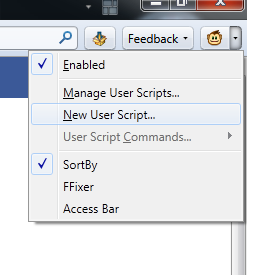
Add new user script in the Greasemonkey:
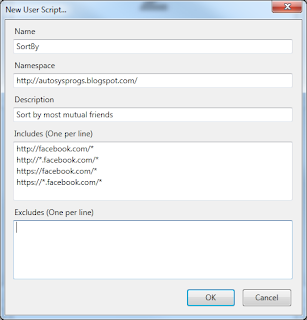
Fill up the following information:
Then copy the following script and past it to the newly opened sortby.user.js file and save it.
In the Facebook's Find Friends page now you can see a button near the hometown filter.
Click it and it will sort people by number of mutual friends.
That's all.
Add new user script in the Greasemonkey:
![]() |
| Add new user script. |
![]() |
| Fill-up. |
In the Facebook's Find Friends page now you can see a button near the hometown filter.
Click it and it will sort people by number of mutual friends.
That's all.
Subscribe to:
Posts (Atom)